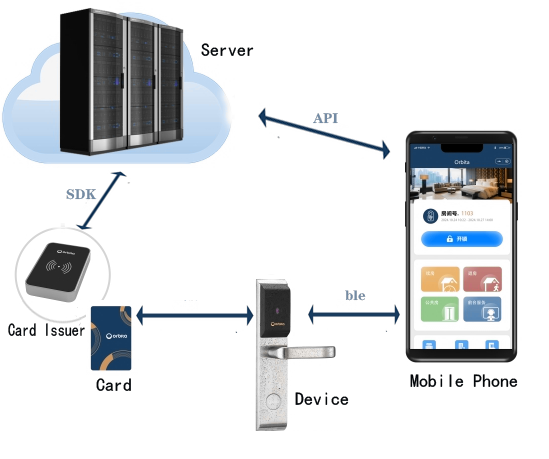
- Bluetooth Integration: The mobile phone calls the API to communicate with the lock via Bluetooth to realize functions such as unlocking the lock.
- Card Function Integration: The third - party application system realizes card issuance through the SDK provided by the Orbit platform and unlocks via the card.

1.3 Application Process
a. Bluetooth Unlocking & Power Switch Power On/Off Process
Broadcast prefix: OBT Service UUID: FFF0 Write Characteristic UUID: FFF1 Notify Characteristic UUID: FFF4
User Operation → Permission Verification → Device Scanning (Obtain MAC address and TID via Get "Obtain Room List") → Device Connection → Service Discovery (FFF0) → Enable Notification (FFF4) → Send Unlock Command (Acquire binary data in advance via Get "Obtain Guest Bluetooth Unlocking Command\Obtain Staff Bluetooth Unlocking Command") → Write Command Data → Monitor Response (Bluetooth Unlock Data Packet Callback) → Process Execution Result
b. Bluetooth Elevator Access Process
User Operation → Permission Verification → Obtain Building Data (Get building ID " via Get Building List or Get Guest Authorized Elevator List") → Acquire Elevator BLE Broadcast Data (via "Get Staff Elevator BLE Broadcast Data or Get Guest Elevator BLE Broadcast Data") → Start BLE Broadcast (Broadcast the acquired data as device broadcast name) → Elevator Receives Broadcast Data → Stop Broadcast